
Manual Table Of Contents
- Design Philosophy
- Quick Start
- Location Details
- Settings
- Components
- Additional Information
- Advanced
Overview
Sun Rays is a powerful planning feature that shows you the direction of sunlight at your saved locations during golden hour—without opening ephemeris tools or checking individual location details. Small directional arrows appear on location cards, instantly telling you whether the sun will be behind you (front-lit) or behind your subject (backlit) at sunrise and sunset.
This feature is particularly valuable for landscape and architectural photographers who need to quickly identify which locations will have ideal lighting conditions on any given day, making it easy to plan golden hour shoots without consulting complex sun position data.
Understanding Sun Rays
Sun Rays display two small directional arrows alongside the sunrise and sunset times on each location card:
Morning Arrow (before sunrise icon): Shows where the sun will be at sunrise relative to the camera position recorded in your photo
Evening Arrow (before sunset icon): Shows where the sun will be at sunset relative to the camera position recorded in your photo
Arrow Directions and What They Mean
Up Arrow (↑): The sun will be behind you (behind the camera position). This creates front-lit or side-lit conditions, ideal for bringing out color, detail, and texture in your subject. The light falls directly on what you’re photographing.
Down Arrow (↓): The sun will be in front of you (behind the subject). This creates backlit conditions, perfect for silhouettes, rim lighting, dramatic skies, or lens flare effects. The light is coming toward the camera.
Left Arrow (←): The sun will be to your left when facing the direction you were facing when you took the photo. This creates side-lighting from the left.
Right Arrow (→): The sun will be to your right when facing the direction you were facing when you took the photo. This creates side-lighting from the right.
Diagonal Arrows (↗ ↘ ↙ ↖): The sun will be at an angle—behind and to the side, or in front and to the side. These combinations help you understand more nuanced lighting situations.
How GeoLog Calculates Sun Rays
Sun Rays work by combining three pieces of information:
- GPS Coordinates – The exact location where you took your photo
- Camera Heading – The compass direction your camera was pointing when you took the photo (stored in photo metadata)
- Current Date – Sunrise and sunset times for today at that location
GeoLog uses these to calculate where the sun will be at sunrise and sunset relative to the direction you were facing. This means the arrows show lighting conditions specifically for the composition you captured, not just generic “where is the sun” information.
Important: Sun Rays always show information for today’s date, not the date when you took the photo. This makes them useful for planning—you can see which locations will have good light conditions today, tomorrow, or any day you’re checking the app.
Camera Heading Matters
The camera heading is crucial to Sun Rays accuracy. When you take photos with the GeoLog Camera or import photos that contain heading metadata, this information is preserved. The arrows then show sun position relative to that specific composition.
Example: You photographed a lighthouse facing north. The morning arrow points up (↑) and the evening arrow points down (↓). This tells you:
- At sunrise, the sun is behind you (south), lighting the lighthouse’s front face
- At sunset, the sun is behind the lighthouse (north), creating backlit conditions
If you had photographed the same lighthouse from the opposite side (facing south), the arrows would be reversed—sunrise becomes backlit, sunset becomes front-lit.
Enabling Sun Rays
Sun Rays is a toggle setting that can be turned on or off based on your preference.
To enable Sun Rays:
- Open Menu → Settings
- Scroll to Display Format section
- Toggle Display Sun Rays to ON (green)
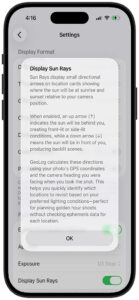
When you first enable the feature, GeoLog displays a detailed explanation dialog describing how the arrows work and what they represent. Tap OK to dismiss.
To disable Sun Rays: Follow the same steps and toggle Display Sun Rays to OFF. The arrows will disappear from location cards, leaving just the sunrise and sunset times visible.
Using Sun Rays for Planning
Sun Rays transforms the location list into a planning tool. Instead of opening each location individually to check ephemeris data, you can scan your list and immediately identify locations with ideal lighting conditions.
Planning Golden Hour Shoots
Scenario 1 – Morning Shoot: You want to photograph a location at sunrise with front-lighting on your subject.
- Open your location list (Home or Search results)
- Scan the morning arrows (before sunrise times)
- Look for up arrows (↑) or arrows pointing toward your preferred side-lighting angle
- These locations will have the sun behind you at sunrise
Scenario 2 – Evening Shoot: You want dramatic backlit conditions at sunset.
- Scan the evening arrows (before sunset times)
- Look for down arrows (↓)
- These locations will have the sun behind your subject at sunset
Scenario 3 – Specific Lighting Angle: You want side-lighting from the right at sunset.
- Scan the evening arrows
- Look for right arrows (→) or diagonal arrows that include a right component (↗ ↘)
- These locations will have the sun to your right at sunset
Real-World Example
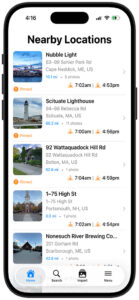
Looking at the location list with Sun Rays enabled:
Nubble Light:
- Morning: Southeast arrow (↘) at 7:02am
- Evening: Northwest arrow (↖) at 4:53pm
- Interpretation: Morning side/backlit from the right, evening side/backlit from the left
Scituate Lighthouse:
- Morning: Southeast arrow (↘) at 7:00am
- Evening: West arrow (←) at 4:56pm
- Interpretation: Morning side/backlit from the right, evening side-lit from the left
92 Wattaquadock Hill Rd:
- Morning: South arrow (↓) at 7:04am
- Evening: Southeast arrow (↘) at 4:59pm
- Interpretation: Morning backlit, evening side/backlit from the right
1-75 High St:
- Morning: Southeast arrow (↘) at 7:02am
- Evening: West arrow (←) at 4:54pm
- Interpretation: Morning side/backlit from the right, evening side-lit from the left
By scanning these arrows, you can instantly see that 92 Wattaquadock Hill Rd offers morning backlit conditions (potentially dramatic), while the other locations offer various side-lighting opportunities.
Understanding the Limitations
Sun Rays provides directional guidance, but there are some important limitations to keep in mind:
1. Simplified Directions: The arrows show compass directions (N, S, E, W, NE, SE, SW, NW) but don’t convey sun altitude (how high above the horizon the sun is). A down arrow (↓) means the sun is behind your subject, but doesn’t tell you if it’s low on the horizon (good for golden hour) or higher in the sky (harsher light).
2. Today’s Date Only: Sun Rays always calculate for the current date. If you’re planning a shoot three months from now, the sun’s position will be different due to seasonal changes in the sun’s path. For detailed future planning, use the Ephemeris tab within the location itself.
3. Terrain and Obstructions: Sun Rays assume unobstructed views. Mountains, buildings, or trees may block the sun even when the arrow suggests ideal lighting. Always consider your location’s specific geography.
4. Weather Dependent: Sun Rays show where the sun will be, not whether you’ll be able to see it. Clouds, fog, and weather conditions obviously affect actual lighting, but the arrows show the sun’s position regardless.
5. Requires Camera Heading: If a photo doesn’t have heading metadata (some cameras and apps don’t record this), Sun Rays may not display or may show inaccurate information. Photos taken with the GeoLog Camera always include accurate heading data.
Tips for Effective Use
Compare Multiple Locations: When planning a shoot, review several locations at once. Sun Rays lets you quickly compare which locations offer your preferred lighting without opening each one individually.
Seasonal Awareness: Sun Rays reflects today’s sun path, which changes throughout the year. In winter, the sun rises and sets further south; in summer, further north. An arrow pointing southeast in December might point east in June at the same location.
Combine with Sunrise/Sunset Times: The arrows tell you direction, but the times tell you when. A location with perfect arrow direction but a 4:30pm sunset in winter might not give you enough golden hour time. Look at both pieces of information together.
Use with Search and Filters: When searching for locations by tags, ratings, or proximity, Sun Rays helps you prioritize which results to visit based on lighting conditions. For example, search for “waterfall” locations, then scan for up arrows at sunrise to find front-lit opportunities.
Field Check at New Locations: When scouting a new location, use the GeoLog Camera and pay attention to the heading. Walk around and take photos from different angles if you want to see how lighting changes with different compositions. Each perspective will show different Sun Rays when you create those locations.
Revisit Existing Locations: If you have a location saved but aren’t seeing the Sun Rays you expected, consider that you may have photographed it from a different angle than you remember. Review the main photo to see exactly where you were standing and which way you were facing.
When Not to Use Sun Rays
Sun Rays is a quick-reference tool, but there are times when you need more detailed information:
Detailed Planning: For critical shoots (client work, once-in-a-lifetime trips, specific astronomical events), use the full Ephemeris tab within the location. This shows sun altitude, azimuth, and hour-by-hour position throughout the day.
Future Dates: If you’re planning a shoot weeks or months ahead, open the specific location and check the Ephemeris tab, where you can adjust the date to see future sun positions.
Precise Timing: Sun Rays show sunrise and sunset times, but golden hour extends before and after these moments. Use the Ephemeris tab to see the full golden hour window and civil/nautical twilight times.
Complex Compositions: If you need to know exact sun altitude (like ensuring the sun won’t be blocked by a ridgeline at a specific time), the Ephemeris tab provides more detailed information than directional arrows alone.
Frequently Asked Questions
Q: Why do some locations not show arrows? Locations without heading metadata won’t display arrows. This typically happens with photos imported from cameras that don’t record compass heading, or very old photos taken before heading metadata was standard.
Q: Can I see Sun Rays for a specific future date? No, Sun Rays always shows today’s information on the location list. To check future dates, open the specific location and use the Ephemeris tab, where you can select any date.
Q: Why did the arrows change from yesterday? The sun’s path shifts slightly each day as the seasons change. Over the course of weeks and months, you’ll notice arrows gradually changing direction as sunrise and sunset positions move along the horizon.
Q: Do Sun Rays account for Daylight Saving Time? Yes, sunrise and sunset times automatically adjust for Daylight Saving Time based on the location’s time zone.
Q: What if I photographed a location at midday? Sun Rays shows sun position at sunrise and sunset regardless of when you took the photo. The heading from your photo is used to calculate the directional relationship between your composition and the sun during golden hours.
Q: Can I customize which arrows are shown? No, Sun Rays is an all-or-nothing feature. You can toggle it on or off, but you can’t selectively show only morning or only evening arrows.
Q: Do Sun Rays work everywhere in the world? Yes, Sun Rays works anywhere on Earth, including polar regions. However, in areas with midnight sun or polar night (summer/winter in far northern or southern latitudes), sunrise and sunset times may not occur, and arrows may not display or may show unusual directions.
Sun Rays transforms your location library into a lighting reference guide. By showing sun direction at a glance, it helps you make faster, more informed decisions about which locations to revisit and when—perfect for photographers who want to maximize their time during golden hour without spending hours studying ephemeris data for every location.