
Manual Table Of Contents
- Design Philosophy
- Quick Start
- Location Details
- Settings
- Components
- Additional Information
- Advanced
Anchor Locations
GeoLog supports Anchor Location Sorting, a powerful planning tool for photographers and location scouts. Choose between sorting your location list by live GPS or a fixed anchor point — enabling intentional workflows when revisiting known areas or planning shoots from afar.
Sorting Modes
Current Location (GPS)
Locations are sorted by your live GPS position.
- The list automatically refreshes every 30 minutes.
- Pull-to-refresh triggers an immediate GPS update and resort.
- Ideal for in-field exploration and spontaneous scouting.
Anchor Mode (Fixed Point)
Locations are sorted relative to a user-defined anchor point.
- The anchor remains active until you change it or restart the app.
- Perfect for pre-planning shoots or organizing locations around a known destination.
The Anchor Tab
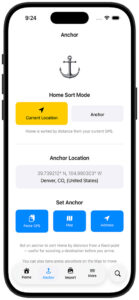
The Anchor menu (⚓ icon) is your dedicated hub for managing the anchor point and switching sort modes.
Mode Toggle
Two large buttons at the top let you switch between Current Location and Anchor mode. The active mode is highlighted in yellow. Switching to Anchor mode immediately re-sorts your Home list by distance from the saved anchor point; switching back returns to live GPS sorting.
Current Anchor Display
The current anchor coordinates are shown below the toggle, along with a reverse-geocoded location label (city, state, country) when available. If no anchor has been set, a “No anchor set” placeholder is shown.
Set Anchor Buttons
Three buttons let you set the anchor point:
| Button | Action |
|---|---|
| Paste GPS | Reads coordinates from the clipboard (e.g. from Apple Maps’ Copy Coordinates). Accepts most common GPS formats. |
| Map | Opens a full-screen map where you can long-press any location to drop the anchor. |
| Address | Opens a text sheet where you can type any address or place name. GeoLog geocodes it and sets the anchor. |
The Search Button (Magnifying Glass)
A search button (magnifying glass) sits next to the floating tab bar. Tapping it opens a context-aware search overlay that slides up from above the tab bar. Its behaviour changes depending on which tab is active.
Searching on the Home Tab
When the Home tab is active, the search overlay filters your location list in real time as you type. Closing the overlay clears the filter. The search matches against location names, notes, and dates.
Date search hint — When GeoLog detects that your query looks like a date (e.g. 2024, March, March 2024, 03/15/2024), a small calendar hint appears below the search bar to confirm date-based filtering is active.
Searching on the Anchor Tab
When the Anchor tab is active, the search overlay doubles as an anchor-setting tool. The placeholder reads “Search locations or paste GPS…” and the overlay gains two additional capabilities:
GPS coordinate detection — If you type or paste raw GPS coordinates (e.g. 37.7749, -122.4194), a “Set as Anchor” row appears instantly. Tap it to set that point as the anchor and dismiss the overlay.
Address search — Type any address or place name and press the keyboard’s Search key. GeoLog geocodes the address and sets it as the anchor automatically.
Quick Pick — A list of your saved GeoLog locations appears below the search bar. Tap any entry to immediately use that location’s coordinates as the anchor — no typing required.
Long-Press on the Map
You can also long-press anywhere on the Map tab to set the anchor point directly. A pin will be dropped at that position and the anchor updates immediately.
Debounce Logic
Continuous resorting based on live GPS drains battery and clutters the UI, especially when moving. GeoLog applies a 30-minute debounce to Home list sorting:
- GPS data is updated continuously (every meter).
- CameraView embeds real-time GPS into EXIF metadata — always accurate.
- The Home list only re-sorts every 30 minutes, unless you pull-to-refresh.
This keeps photo metadata precise while the UI stays lean and battery-friendly.
Feature Summary
| Feature | Description |
|---|---|
| ⚓ Anchor Tab | Dedicated tab for managing the anchor point and sort mode |
| 🔍 Search Button | Floating magnifying glass opens context-aware search overlay |
| 🏠 Home Search | Live text + date filtering of the location list |
| 📍 Anchor Search | GPS paste, address entry, or Quick Pick from saved locations |
| 🗺️ Map Long-Press | Drop anchor directly on the map |
| ⏱️ Debounced Resorting | 30-minute refresh interval for battery efficiency |
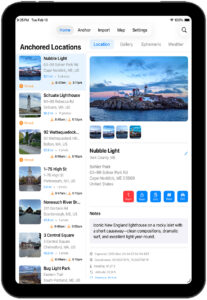
| 📱 iPad Layout | Search via nav bar; Anchor tab functions identically |
| 📸 Real-time GPS | Always-accurate photo EXIF metadata, unaffected by debounce |