
Manual Table Of Contents
- Design Philosophy
- Quick Start
- Location Details
- Settings
- Components
- Additional Information
- Advanced
Overview
The Ephemeris feature shows where the sun and moon are in the sky at any time, for any location in your library. It is the planning heart of GeoLog — use it to know exactly when and where the light will be before you ever leave home, and to understand the light conditions of photos you have already taken.
GeoLog’s ephemeris engine is built on Jean Meeus’s Astronomical Algorithms and handles every location on Earth correctly — including extreme latitudes above the Arctic and Antarctic Circles where other apps fail.
Accessing the Ephemeris
Open any location from your library and tap the Ephemeris tab. The compass rose loads immediately, showing the current sun and moon positions for that location at the current time.
You can also access the Ephemeris directly from the Home screen by tapping the ephemeris icon on a location card.
Tap the ⓘ button beside the Ephemeris title for instant in-context help covering every element of the display.
Reading the Compass Rose
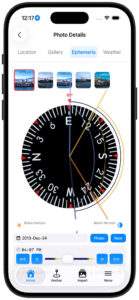
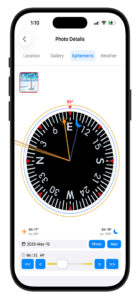
The compass rose is the heart of the Ephemeris display. It rotates with your phone — what you see in front of you is always at the top. The red triangle at 12 o’clock marks the direction the phone is currently pointing, shown in degrees above the triangle.
Sun and Moon Needles
The sun needle (gold/orange) and moon needle (blue-gray) extend from the center of the compass toward each body’s current azimuth — its compass bearing from your position. The azimuth and altitude for each body are displayed in the data strip below the compass rose.
- Azimuth — compass bearing to the body (0° = North, 90° = East, 180° = South, 270° = West)
- Altitude — how high the body is above the horizon in degrees. A negative altitude means the body is below the horizon.
SunPath and MoonPath
The SunPath (outer gold arc) and MoonPath (outer blue-gray arc) trace the full above-horizon trajectory of each body across the sky for the selected day — from rise azimuth, through transit, to set azimuth.
At a glance you can see whether the sun will be coming from the left or right of your scene, and roughly when during the day it will be in a useful position relative to your composition.
The DomeArc
The DomeArc is the inner arc that bows toward the center of the compass rose. Its depth toward center is proportional to the body’s maximum altitude — how high it climbs above the horizon at transit.
- A winter sun that barely clears the horizon produces a shallow arc hugging the outer ring
- A summer sun that climbs steeply produces a deep arc reaching well toward center
This gives you an immediate sense of the quality and angle of the light at this location, not just its compass direction. A shallow DomeArc means low raking light — often dramatic for landscapes. A deep DomeArc means high overhead light — less flattering for most scenes.
Rise and Set Times
The rise and set times for both the sun and moon are displayed at the bottom of the screen in your local timezone. For locations where the sun or moon does not rise or set on the selected day — such as polar night or the midnight sun — GeoLog displays the appropriate condition rather than a time.
The Photo Strip
When viewing Ephemeris from a saved location, a row of photo thumbnails appears above the compass rose. Each thumbnail represents a gallery photo that has GPS coordinates, a compass heading, and timezone data.
Tapping any thumbnail updates the entire ephemeris display to that photo’s exact position and orientation. Two photos taken 50 feet apart at the same location may show meaningfully different sun and moon positions relative to the scene — particularly useful when comparing multiple angles or vantage points.
The Ephemeris can also run without any photo selected, using the location’s saved GPS coordinates and the phone’s live compass heading.
The Photo Button
The Photo button — shown in the date row beside the Now button — rewinds the ephemeris to the exact moment the selected gallery photo was taken, placing the sun and moon precisely where they were when the shutter fired.
This lets you:
- Learn from past shots — see exactly what the light was doing when a photo worked or didn’t
- Plan the return — know precisely what sun or moon position you need to recreate or improve the shot
- Connect the scene to the sky — confirm whether a composition was captured at golden hour, blue hour, midday, or moonrise
To use the Photo button:
- Tap a gallery photo in the photo strip above the compass
- The ephemeris updates to that photo’s GPS position and heading
- Tap Photo to jump to the exact moment of capture
- Tap Now to return to the current time
The Time Slider
The time slider at the bottom of the Ephemeris view controls the moment being displayed. Dragging it advances or rewinds time continuously, updating the needle positions, arc shapes, and rise/set times in real time.
- The < and > buttons step one day at a time
- The << and >> buttons jump one month at a time
Stepping through months lets you see how the sun and moon positions, path directions, and arc heights change throughout the year for your scouted location. This reveals which months offer the best light angle, the highest sun for a particular scene, or the ideal moon position for a planned night shoot.
Yesterday and Tomorrow Badges
The moon rises approximately 50 minutes later each day. On some calendar days the moon sets before it rises — moonset occurs just after midnight, followed by moonrise in the afternoon or evening. When the relevant rise or set event crosses a day boundary, GeoLog labels it with a Yesterday or Tomorrow badge so you always know which calendar day that event belongs to.
Magnetic and True North
GeoLog v2.3 supports both magnetic north and true north for the compass heading. Toggle between them in Settings.
- True North — aligns with geographic north as used on topographic maps and planning apps. Recommended for most photography planning.
- Magnetic North — what your compass physically points to. Varies by location and changes slowly over time due to shifts in Earth’s magnetic field.
For most photographers true north is more useful, since it matches the directions printed on maps and used by other planning tools.
High Latitude and Circumpolar Support
GeoLog’s ephemeris engine handles extreme latitudes correctly — including locations where the sun or moon never rises or never sets on a given day.
Midnight sun — above the Arctic Circle in summer, the SunPath arc completes a full circle. No rise or set times are shown because the sun never crosses the horizon. The DomeArc shows how high the sun remains above the horizon throughout the day.
Polar night — when the body never rises, the arc is absent entirely and the display notes that no rise or set occurs that day.
Circumpolar moon — the moon’s orbital tilt means it too can be circumpolar at high latitudes depending on where it sits in its 18.6-year orbital cycle. GeoLog handles this correctly for both the sun and moon, at any latitude on Earth.
This support was added in v2.3 after testing above the Arctic Circle revealed that the original engine failed silently at extreme latitudes.
Planning Shoots with Ephemeris
Golden Hour
Open your location and tap the Ephemeris tab. The SunPath arc shows the full arc of the sun across the sky for today. Use the time slider to find when the sun will be at the azimuth that best complements your composition — coming from the left, right, or directly behind you.
Golden hour windows:
- Morning — the 30 minutes after sunrise
- Evening — the 30 minutes before sunset
The DomeArc tells you how high the sun will be during these windows. In winter at northern latitudes the sun stays low all day — watch for a shallow DomeArc indicating flat, warm light throughout the afternoon.
Blue Hour
Civil twilight — the period roughly 30 minutes before sunrise and after sunset — often produces the most even, soft light of the day. GeoLog shows civil and nautical twilight times in the rise/set strip at the bottom of the screen.
Moonrise Photography
The full moon rises near sunset and sets near sunrise — check the time slider near the sunset time to find when the moon clears the horizon. The MoonPath arc shows which direction to face. A deep MoonPath DomeArc means the moon will climb high; a shallow arc means it stays low and large-looking near the horizon.
Moon phases cycle approximately every 29.5 days. A full moon is best for moonrise shots — it rises with enough sky brightness to expose both the moon and the landscape in a single frame.
Multi-Month Planning
Use the << and >> buttons to step through months and watch how the SunPath arc shifts position and the DomeArc changes depth. For a location that needs side lighting from the north in morning, you can quickly find which months put the sunrise azimuth in that direction.
Sun Rays on the Home Screen
Sun Rays appear on location thumbnails on your home screen, showing the direction of sunlight at sunrise and sunset relative to the camera heading used when the photo was taken.
Reading the Arrows
- ↑ Up arrow — at this time, the sun will be behind you (backlit scene)
- ↓ Down arrow — at this time, the sun will be in front of you or above (front-lit scene)
Enable Sun Rays
Settings → Display → Show Sun Rays
Why This Matters
A quick glance at the home screen tells you the optimal time to return to each location without opening the Ephemeris. Front-lit at sunrise, backlit at sunset — or vice versa — is immediately visible on every location card.
Settings
Customize the Ephemeris display from Settings:
- Time Format — 12-hour or 24-hour display
- Twilight Display — show or hide civil and nautical twilight periods
- Sun Rays — enable sun direction arrows on home screen location cards
- North Reference — toggle between Magnetic North and True North
Accuracy
Calculations are based on Jean Meeus’s Astronomical Algorithms and are accurate to within a few seconds for rise and set times at any location on Earth. Atmospheric refraction can affect the apparent sunrise and sunset by approximately two minutes. Horizon obstructions such as mountains or buildings will change apparent times beyond what GeoLog can calculate — use the compass bearing to judge when the sun will clear a specific obstacle.
For further reading on the mathematics behind GeoLog’s ephemeris engine, see The Math Behind GeoLog’s Ephemeris on GeekDistractions.com.