
Manual Table Of Contents
- Design Philosophy
- Quick Start
- Location Details
- Settings
- Components
- Additional Information
- Advanced
Overview
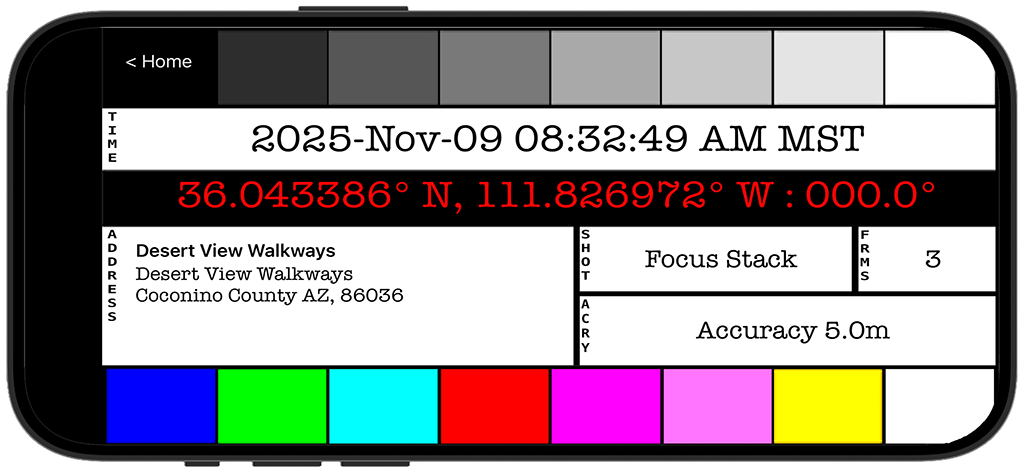
The Digital Slate is a screen you can photograph at the beginning of a shoot to embed location and time metadata into your photo sequence. Think of it like a filmmaker’s clapperboard—you photograph it, then use your regular camera.
Why use it?
- Your camera doesn’t have GPS
- You want location data without attaching external GPS units
- You need a reference frame showing exactly when and where you shot
What the Slate Shows
The slate displays:
Timestamp
- Current date and time with timezone
- Updates in real-time
- Large, easy-to-read format
GPS Coordinates
- Latitude and longitude
- Heading (compass direction you’re facing)
- In bright red for high contrast
Address
- Street address or location name
- City, state, country
- Looked up automatically from GPS
SMPTE Reference Bars
- Grayscale bars across the top
- Color reference bars (if enabled in Settings)
- Useful for exposure and color reference
Using the Slate
Basic Workflow
- Open GeoLog and tap Slate
- Wait for GPS lock (coordinates appear)
- Hold phone at location
- Photograph the screen with your main camera
- Now shoot your actual photos with your camera
- Later, you’ll have the location metadata in the slate photo
Practical Example
Wedding photographer without GPS in camera:
- Arrive at ceremony location
- Open GeoLog slate on iPhone
- Photograph the slate screen with your camera
- Put phone away and shoot the wedding
- In post-production, the slate photo tells you exactly where each sequence was shot
Landscape photographer with film camera:
- Set up at viewpoint
- Open slate, wait for GPS
- Photograph slate with first frame of film
- Now you have location data on film
- Return visits use exact coordinates
Settings
Customize the slate in Settings → Slate:
Date Format
- ISO (2026-01-12)
- US (01/12/2026)
- European (12/01/2026)
Time Format
- 12-hour (with AM/PM)
- 24-hour
Coordinate Format
- Decimal degrees (36.123456°)
- Degrees, minutes, seconds (36° 07′ 24.4″)
Color Bars
- Enable/disable SMPTE color bars
- Just for visual reference
Tips
For Best Results:
- Wait for GPS to lock before photographing slate
- Hold phone steady while your camera focuses on screen
- Frame tightly so text is readable in final photo
- Photograph slate as first frame of each location sequence
Organization:
- One slate photo per location or time period
- In long shoots, re-photograph slate when moving locations
- Slate photos serve as visual separators in your image sequence
Lighting:
- Screen brightness affects readability
- In bright sun, max out phone brightness
- Shield screen from direct sunlight if needed
When to Use the Slate
Perfect for:
- Cameras without GPS
- Film photography
- Professional workflows where metadata is critical
- Multiple camera setups (photograph slate with each camera)
Not needed if:
- Your camera already has GPS
- You only use GeoLog’s built-in camera
- You don’t need location metadata
Related Features
© 2026 GeoLog. All rights reserved.