
Manual Table Of Contents
- Design Philosophy
- Quick Start
- Location Details
- Settings
- Components
- Additional Information
- Advanced
Search
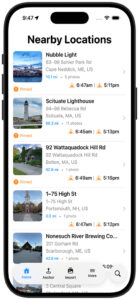
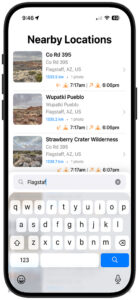
The search button — a magnifying glass circle in the floating tab bar — gives you fast access to any location in your library. Tap it to open a search overlay that slides up from the bottom of the screen, keyboard-first and ready to type.
Closing the overlay (tap the X or dismiss the keyboard) instantly restores the full list.
What You Can Search
Search matches against everything GeoLog knows about a location. You don’t need to remember exactly what you named something — any of these will find it:
Location Name (Title)
The name you gave the location when you saved it.
Example:
lighthouse,Hidden Falls,studio
Address
The street address, city, state, or region associated with the location. GeoLog stores the full reverse-geocoded address, so you can search any part of it.
Example:
Main St,Portland,Oregon,France
Notes
Any notes you wrote when saving or editing the location.
Example:
blue hour,no parking,best in winter
Date
You can search by when you saved the location. GeoLog understands dates written several ways — you don’t need an exact format.
| What you type | What it matches |
|---|---|
2024 | All locations saved in 2024 |
March or Mar | All locations saved in any March |
March 2024 or Mar 2024 | Locations saved in March 2024 |
2024-03-15 | Locations saved on that specific date |
When GeoLog detects that your query looks like a date, a small calendar hint appears below the search bar to confirm date-based filtering is active.
How It Works
Search filters your Home list in real time as you type. The list updates with every character — no need to press Search or confirm anything. The list returns to its full sorted order as soon as you close the overlay.
Search is case-insensitive, so portland, Portland, and PORTLAND all return the same results.
Tips for Finding a Specific Shot
- You scouted it last spring but can’t remember the name → search
April 2024or justApril - You know it was somewhere in Vermont → search
Vermont - You added a note about golden hour → search
golden - You named it after the road → search the road name or part of it
- You want everything from a recent trip → search the city or region name
Any one of these is enough — search checks all fields at once.