
Multi-Camera Time Sync Tool for iPhone and iPad
You arrive at a wedding, a sports event, a news scene — three cameras, three photographers, three clocks that have never agreed with each other. One is three minutes fast. One is in the wrong timezone. One is just off, and nobody is sure by how much. The shoot happens anyway. An hour later, 1,200 photos land in Lightroom in chronological chaos. CameraTimeSync was built for the minute before that problem starts.
One reference image. Every clock corrected.
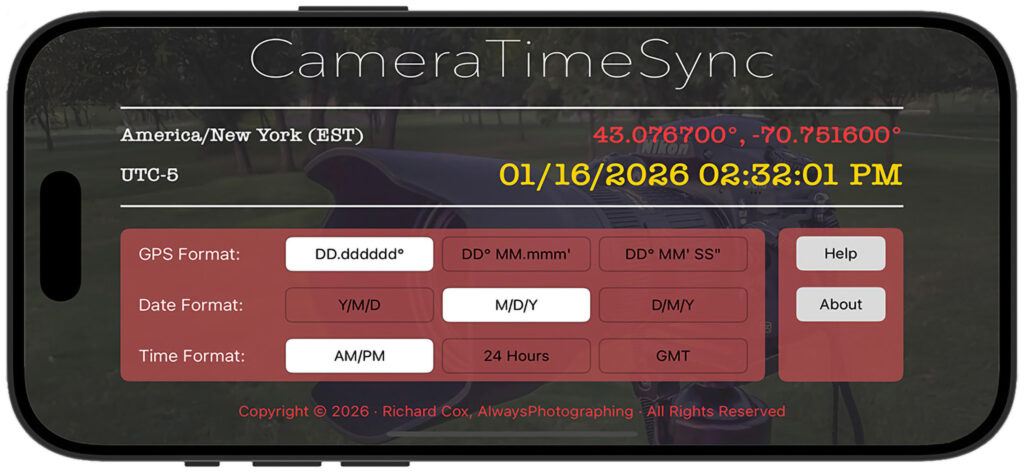
The premise is simple but the execution matters: CameraTimeSync displays a GPS-synchronized time reference — atomic-clock accurate, pulled directly from satellite signals — that each photographer photographs with their camera before the shoot begins. That single frame becomes the correction key for every image that camera produces. In Lightroom, you enter the time shown on that reference image, and the software does the arithmetic. Every photo from that camera shifts by the exact offset. No manual clock adjustments. No guessing at drift.
GPS time is what makes this work. Unlike your iPhone’s network clock, which can lag or jump when switching towers, GPS time is synchronized to microseconds and operates independently of cellular or Wi-Fi. It doesn’t drift, it doesn’t care what timezone you’re in, and it doesn’t require any account or connection beyond line of sight to the sky. CameraTimeSync uses that signal as the one source of truth for every camera in the room.
The display is designed to be photographed. Timezone name and UTC offset sit in the top left. Your GPS coordinates — in decimal degrees, degrees-minutes, or full DMS — appear top right to confirm everyone is at the same venue. The date and time are set large in the center, bold enough to read from a frame taken at a normal shooting distance, updating every second. Maximum brightness keeps it readable in any light.
What’s inside
GPS-synchronized time display The central display draws time directly from GPS satellite signals, not from the device’s network clock. The date and time update every second and are formatted to be photographed — large, high-contrast, readable at camera distance. This is the reference your cameras capture, and it’s accurate to the second regardless of where in the world you’re shooting.
Configurable display formats Three selectors let you match the display to your team’s convention before the shoot starts. GPS coordinates display in decimal degrees, degrees-minutes, or full degrees-minutes-seconds. Date format switches between Y/M/D, M/D/Y, and D/M/Y. Time format toggles between 12-hour and 24-hour. Set it once before the team gathers; the display remembers your preference.
Timezone and UTC offset The full timezone name and UTC offset are always visible in the display. For international events or mixed teams working across time zones, this eliminates the ambiguity of whether a given timestamp is local or not. Every reference photo carries the complete timezone context.
iPad support On an iPad, the display scales up — which matters when you’re holding a device steady for six photographers to photograph in sequence. The larger screen is easier to frame at a distance, easier to verify is in focus, and easier to read in the bright outdoor conditions that cause glare problems on a phone-sized display. iPhone and iPad both work; for large teams, iPad is the right choice.
iPhone and iPad
On iPhone, CameraTimeSync travels in a jacket pocket to locations where multi-photographer coverage happens — weddings, sports venues, press areas. The compact form makes it easy to hold steady while photographers take their reference frames one at a time.
On iPad, the larger display becomes a shared reference point for bigger teams. The date and time read clearly from farther away, multiple photographers can verify focus at once, and in outdoor conditions where glare can obscure a phone screen, the extra surface area gives you more options for shielding and framing.