
Rethinking Location Scouting for Real-World Photography
For years, I’ve wrestled with the same problem many landscape and location photographers face: how do you effectively scout and plan return visits to locations when you’re not standing there?
Don’t get me wrong—apps like The Photographer’s Ephemeris (TPE) and PhotoPills are excellent tools when you’re on location. Open them up, see where the sun will be, plan your shot. They excel at precision planning: lining up that sunset behind a church spire, calculating the exact moment the Milky Way aligns with an arch. But here’s the thing: those hyper-precise, Instagram-perfect alignments increasingly look contrived in today’s AI-saturated photography world. I’m not chasing those moments.
What I am chasing is good light. Natural light. The kind where the sun is generally behind my subject for an interesting silhouette, or providing nice frontal lighting that brings out texture and detail. I don’t need the sun at exactly 247.3° azimuth—I need to know if October or March gives me better light for a particular scene.
The Workaround That Wasn’t Working
My old workflow was a Rube Goldberg contraption: Use Theodolite to photograph a scene and capture GPS data. Drop that into an Apple Note. Manually enter coordinates into TPE. Try to visualize when to return. It worked, technically, but it was clunky and slow.
I kept thinking: why can’t I just tap a button and jump from my scouting photo directly into TPE or PhotoPills with the GPS coordinates and heading already loaded? Turns out, neither app exposes URL schemes for this. So I did what any photographer-developer would do: I built my own solution.
Introducing GeoLog
GeoLog is location-centric photo scouting designed around how photographers actually work. You return to locations multiple times. You shoot different compositions. You photograph interpretive signs for reference. You scout in summer and return in winter. A location isn’t a single photo—it’s a collection of possibilities.
No Barriers in the Field
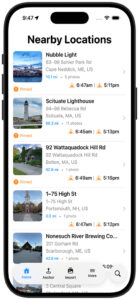
The last thing you need when you’re scouting is an app that demands data entry. There’s no pressing a (+) button, no typing in location names or coordinates. Import a location-aware photo or snap one with GeoLog’s camera—that’s it. GeoLog automatically generates the title and address information. Done. You’re free to focus on composition and lighting.
You can edit the title or add notes later if you want, but GeoLog isn’t getting in your way while you’re in the field capturing potential compositions. The app works around your photography workflow, not the other way around.
Return to a spot a week later? GeoLog recognizes you’re at a known location and asks: “Are these gallery photos for the existing location, or is this a new spot?” That’s the kind of intelligence that only makes sense when you’ve actually been out there scouting.
Camera Crop Marks for Real Planning
When I’m scouting with my iPhone, I need to know what this scene will look like through my Nikon with a 24mm lens, or my 70-200mm. GeoLog overlays crop marks so I can visualize the final composition with the gear I’ll actually bring back. No more guessing whether I need the wide-angle or the telephoto.
Relative Sun Planning, Not Precision Gymnastics
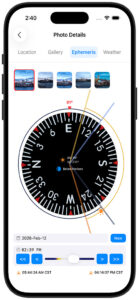
When I’m reviewing potential locations at home, I bring up a spot in GeoLog and use the Ephemeris view. Those simple << and >> buttons let me scrub through months at a time. October sunrise? Not quite. November? Better. December? Perfect—the sun will be low on the horizon behind that rock formation. That’s the kind of relative planning that actually helps me make decisions about when to return.
Exposure Compensation for the Real World
As both a digital and film photographer, I run into a problem that most camera apps ignore: what happens when you stack ND filters beyond what your camera’s meter can handle? You’re in bulb mode with a stopwatch, doing mental math to compensate for neutral density filters—and if you’re shooting film, you’re also calculating reciprocity failure.
GeoLog’s Exposure Compensation (EC) feature solves this. Enter your base exposure, add your ND filter value, and GeoLog calculates the actual exposure time you need—including reciprocity compensation using industry-standard algorithms for film photographers.
But it doesn’t stop at calculation. The built-in timer works even when you turn off your phone screen, using the Dynamic Island to keep you informed. You get 10-minute and 2-minute warnings during long exposures, so you’re not constantly checking your watch during a 15-minute exposure. It’s the kind of feature that only makes sense when you’ve actually been out there at golden hour, trying to juggle a stopwatch, ND filters, and composition.
GeoLog also includes Depth of Field (DoF) and Field of View (FoV) calculators—though I’ll admit the FoV tool started as a testing mechanism for the crop marks feature and turned out to be useful in its own right.
Get There: Driving Directions Built In
Ready to shoot? Tap the driving directions button on any location and GeoLog launches navigation from your current position to the photo spot. No more fumbling between apps or trying to remember which turnoff led to that perfect overlook.
The Gallery Advantage
The gallery feature captures how photographers actually work. Multiple compositions from different angles. Interpretive signs and wayside markers. Reference shots for later captioning. When I’m preparing images for museum labels, exhibition descriptions, or accurate captions, having that reference material tied to the exact location is invaluable.
iCloud Sync Across Devices
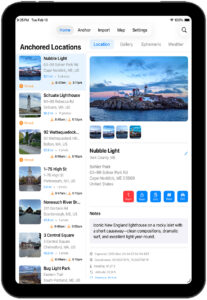
Your scouting work syncs seamlessly across all your devices. Scout on your iPhone in the field, plan on your iPad at home, check details on your Mac before you leave. Everything stays in sync.
Built by a Photographer, for Photographers
As a Fellowship photographer with the Dallas Camera Club and a member of several other camera clubs over the years, I’ve learned that successful photography is as much about preparation and return visits as it is about being in the right place at the right time. GeoLog is the tool I wished existed—one that thinks about locations the way photographers actually think about them, removes friction from the scouting process, and makes planning practical rather than overly complex.
What’s Next
GeoLog is just getting started. Future enhancements will include comprehensive trip planning with anchored locations (set a home base and plan from there, with date-specific ephemeris data), OCR for interpretive signs (automatically extract text to your notes), and trip essentials like nearby hotels and campsites. The goal remains the same: make location scouting and trip planning as frictionless as possible.
If you’ve ever found yourself frustrated with overly complex planning apps, or if you’ve cobbled together your own workaround system for scouting locations, GeoLog is ready to simplify your workflow.
See the light. Plan the shot. Master the moment.

Leave a Reply